
Digigyor Digigyor
  • Home
  • About Us
  • Services
    • Amazon Full Account Management
    • Amazon PPC Management
    • Amazon Listing Optimization
    • Amazon A+ Content Design
    • Amazon Keyword Research
    • Amazon Brand Registry
    • Amazon SEO Services
    • Amazon Inventory Management
    • Amazon Product Research
    • Amazon Catalog Management
  • Portfolio
  • Contact
  • Blog
Digigyor Digigyor
  • Home
  • About Us
  • Services
    • Amazon Full Account Management
    • Amazon PPC Management
    • Amazon Listing Optimization
    • Amazon A+ Content Design
    • Amazon Keyword Research
    • Amazon Brand Registry
    • Amazon SEO Services
    • Amazon Inventory Management
    • Amazon Product Research
    • Amazon Catalog Management
  • Portfolio
  • Contact
  • Blog
Connect Us
Digilink Logo Light Digilink Logo Dark
Digigyor Digigyor
  • Home
  • About Us
  • Services
    • Amazon Full Account Management
    • Amazon PPC Management
    • Amazon Listing Optimization
    • Amazon A+ Content Design
    • Amazon Keyword Research
    • Amazon Brand Registry
    • Amazon SEO Services
    • Amazon Inventory Management
    • Amazon Product Research
    • Amazon Catalog Management
  • Portfolio
  • Contact
  • Blog
How to sell on Amazon for free

Ecommerce today has become a great way to shop simply with a click. It has transformed traditional shopping beyond recognition. Not very long ago, people didn’t trust online products, but today, improved services have gained customers’ trust.

Ecommerce has become a buzz. And people keep surfing all the time and shop very frequently as it has become easy and attractive for people to shop online. The services like cash on delivery, easy return & refund have made it easier. Customers are more than satisfied. It is a smart way to shop.

What is Amazon Seller Central?

Amazon seller account

Amazon Seller Central is a web interface between merchants and customers that is used by millions of sellers to sell their products online through Amazon to Amazon customers. For this, an Amazon FBA seller must have a seller central account, and the seller will be considered a third-party seller or marketplace.

Amazon provides you with two options for the fulfillment of your orders. You can do it through Amazon, where you don’t have to worry about your orders’ shipping, packaging, and delivery. Amazon will keep your products in its warehouse and deliver them to your customer’s doorstep. It will even take care of refunds and customer care services.

And the second option is to make the fulfillment on your own. You can appoint people for the whole process by not paying Amazon.

Learn more about fulfillment options Amazon FBA vs FBM.

How to Create an Account on Amazon Seller Central?

Amazon Seller Central USA

Starting an Amazon FBA business and selling on Amazon is very simple. All you need to do is create an account and get started. You can start with wholesale products, Handmade products, or even sell things you no longer use. 

After some time, you can make it as big as you want or as basic as you like.

Once you’ve figured out the best products to sell on Amazon FBA, you’ll have to register yourself on Amazon, which means creating an account on Amazon.

6 Quick Steps to Create an Amazon Seller Central Account

Step 1: First, Open Amazon Official Site

Open https://sell.amazon.com

Click on the link and you’ll reach the Amazon seller page.

Step 2: Choose to Sign up from “Become an Amazon seller”

Here, click the sign-up button. Choose between an individual or professional seller account.

Things to Remember: There are two options to choose from while creating an account on Amazon Seller Central. One as a professional seller and the other as an Individual seller. If you are going to do FBA or have a big catalog, then you should choose a Professional plan, which will cost $39.99 a month. And if you are not a professional, you can sell less than 40 products monthly. You‘ll not be charged for it.

Step 3: Get started selling on Amazon “Create a New Account”

Here you need to fill in the basic personal information. Enter your Email address or phone number and strong password then click “Create a New Account”.
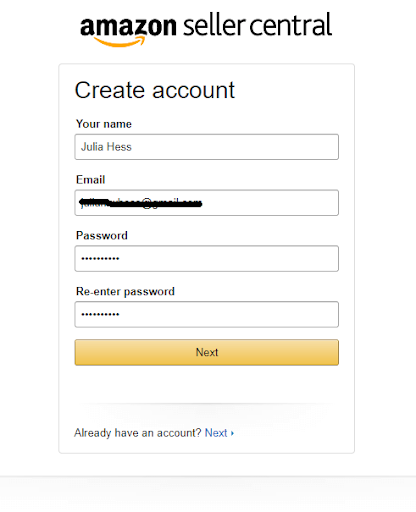
Amazon Seller Central login

Step 4: Give a legal name to your store

After sign-up and account setup, Amazon will now ask for the Legal name of your store. If you are not a professional, you can put any unique name for your Amazon Store and click to agree with the Terms and conditions.

Step 5: Fill in required business details and information

Now, Amazon will ask you to input your business information and to enter your contact number for OTP.

Step 6: At last, Set up billing information and done

After filling business information, you need to fill in the billing information so that you can pay the charges to Amazon when required. That’s all you have successfully created an account on Amazon seller central. Now, log in.

Step 7: Log in to your account

Now to can simply enter your ID and Password and log in to your account. https://sellercentral.amazon.com Click to login.

Once your Amazon account is created, you can start selling your products on Amazon. 

For that, you need to follow the following steps:

How to Sell Products on Amazon?

1. Product Listing

For selling your products on Amazon, you’ll have to list your product first so that customers can see your products and buy them. But, How to do Amazon product listing? Follow the link to learn more.

Amazon individual seller account

you’ll also need to prepare a product description with some good keywords with the best amazon keyword research tool so that your product can reach your customer. And also add pictures of your product for a better understanding of it. You can always hire a professional for this.

2. Receiving Orders

Once your product is listed, Your product will reach millions of customers and you’ll start receiving orders.
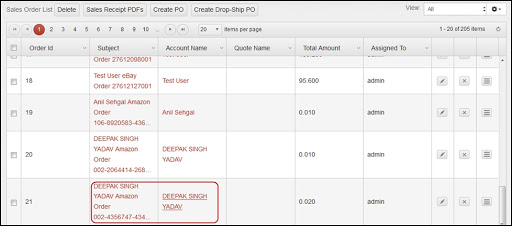
How to sell on Amazon for beginners

If your product is fulfilled by Amazon you’ll get the prime membership or you can also take sponsored ads to reach your targeted audience.

3. Product Delivery

In this step, you need to decide whether you want to get your products delivered by Amazon or you want to do it by yourself.

If you take the fulfillment by Amazon service, you’ll not have to worry about the product shipment, packaging, storage, and delivery. Amazon will take care of everything including the returns, refunds, and customer service. Apart from this, you also get benefits like Prime Memberships, Add to bag options, and professional services. 

And if you want to do it on your own, you’ll have to hire some professionals for the same. You can decide it by comparing the cost incurred in both.

Get your Amazon store launched quickly with the best Amazon store management agency. We provide complete assistance from setting up Amazon store to selling on Amazon. Get in touch with us now!

4. Receiving Payments

Once you are done with this process, you’ll start receiving your payments. Amazon will deduct its seller’s fees from your payments, and you’ll receive the remaining amount in your account in 14 days; for more, contact an Amazon expert consultant in the USA.

Conclusion

By following these simple steps, you can create an account on Amazon, find the best Amazon FBA suppliers, and start selling your products online.

  • By admin
  • June 4, 2020
Posted in amazon BusinessTags Amazon Seller Central Account Amazon Seller Registration Create an Account on Amazon

Recent Posts

  • The-Top-10-Amazon-SEO-Tools-for-2026
    The Top 10 Amazon SEO Tools for 2026
  • Amazon Keyword Research for Product Listings
    Amazon Keyword Research for Product Listings — Step-by-Step Guide
  • How to Write High-Converting Amazon Product Descriptions
    How to Write High-Converting Amazon Product Descriptions
  • 15 Questions to Ask Before Hiring an Amazon SEO Consultant in 2026
    15 Questions to Ask Before Hiring an Amazon SEO Consultant in 2026

Catagory

  • Uncategorized

Tag

Latest News

  • The-Top-10-Amazon-SEO-Tools-for-2026
    The Top 10 Amazon SEO Tools for 2026
  • Amazon Keyword Research for Product Listings
    Amazon Keyword Research for Product Listings — Step-by-Step Guide
  • How to Write High-Converting Amazon Product Descriptions
    How to Write High-Converting Amazon Product Descriptions

Connect With an Expert

Get a free consultation from our team — response within 24 hours.

Select Country
Afghanistan
Albania
Algeria
American Samoa
Andorra
Angola
Anguilla
Antarctica
Antigua and Barbuda
Argentina
Armenia
Aruba
Australia
Austria
Azerbaijan
Bahamas
Bahrain
Bangladesh
Barbados
Belarus
Belgium
Belize
Benin
Bermuda
Bhutan
Bolivia
Bosnia and Herzegovina
Botswana
Brazil
Brunei Darussalam
Bulgaria
Burkina Faso
Burundi
Cambodia
Cameroon
Canada
Cape Verde
Cayman Islands
Central African Republic
Chad
Chile
China
Colombia
Comoros
Congo
Congo, Democratic Republic of the
Cook Islands
Costa Rica
Croatia
Cuba
Cyprus
Czech Republic
Denmark
Djibouti
Dominica
Dominican Republic
Ecuador
Egypt
El Salvador
Equatorial Guinea
Eritrea
Estonia
Ethiopia
Fiji
Finland
France
Gabon
Gambia
Georgia
Germany
Ghana
Gibraltar
Greece
Greenland
Grenada
Guatemala
Guinea
Guinea-Bissau
Guyana
Haiti
Honduras
Hong Kong
Hungary
Iceland
India
Indonesia
Iran
Iraq
Ireland
Israel
Italy
Jamaica
Japan
Jordan
Kazakhstan
Kenya
Kiribati
Korea (North)
Korea (South)
Kuwait
Kyrgyzstan
Laos
Latvia
Lebanon
Lesotho
Liberia
Libya
Liechtenstein
Lithuania
Luxembourg
Macao
North Macedonia
Madagascar
Malawi
Malaysia
Maldives
Mali
Malta
Marshall Islands
Martinique
Mauritania
Mauritius
Mayotte
Mexico
Micronesia
Moldova
Monaco
Mongolia
Montenegro
Montserrat
Morocco
Mozambique
Myanmar
Namibia
Nauru
Nepal
Netherlands
New Caledonia
New Zealand
Nicaragua
Niger
Nigeria
Niue
Norfolk Island
Norway
Oman
Pakistan
Palau
Panama
Papua New Guinea
Paraguay
Peru
Philippines
Poland
Portugal
Puerto Rico
Qatar
Reunion
Romania
Russia
Rwanda
São Tomé and Príncipe
Saudi Arabia
Senegal
Serbia
Seychelles
Sierra Leone
Singapore
Slovakia
Slovenia
Solomon Islands
Somalia
South Africa
South Sudan
Spain
Sri Lanka
Sudan
Suriname
Sweden
Switzerland
Syria
Taiwan
Tajikistan
Tanzania
Thailand
Timor-Leste
Togo
Tokelau
Tonga
Trinidad and Tobago
Tunisia
Turkey
Turkmenistan
Tuvalu
Uganda
Ukraine
United Arab Emirates
United Kingdom
United States
Uruguay
Uzbekistan
Vanuatu
Venezuela
Vietnam
Wallis and Futuna
Yemen
Zambia
Zimbabwe
No results found
+Code
+93 Afghanistan
+355 Albania
+213 Algeria
+376 Andorra
+244 Angola
+54 Argentina
+374 Armenia
+61 Australia
+43 Austria
+994 Azerbaijan
+1-242 Bahamas
+973 Bahrain
+880 Bangladesh
+375 Belarus
+32 Belgium
+501 Belize
+229 Benin
+975 Bhutan
+591 Bolivia
+387 Bosnia and Herzegovina
+267 Botswana
+55 Brazil
+673 Brunei
+359 Bulgaria
+226 Burkina Faso
+257 Burundi
+855 Cambodia
+237 Cameroon
+1 Canada
+238 Cape Verde
+236 Central African Republic
+235 Chad
+56 Chile
+86 China
+57 Colombia
+242 Congo
+243 Congo DR
+506 Costa Rica
+385 Croatia
+53 Cuba
+357 Cyprus
+420 Czech Republic
+45 Denmark
+253 Djibouti
+593 Ecuador
+20 Egypt
+503 El Salvador
+291 Eritrea
+372 Estonia
+251 Ethiopia
+679 Fiji
+358 Finland
+33 France
+241 Gabon
+220 Gambia
+995 Georgia
+49 Germany
+233 Ghana
+30 Greece
+502 Guatemala
+224 Guinea
+509 Haiti
+504 Honduras
+852 Hong Kong
+36 Hungary
+354 Iceland
+91 India
+62 Indonesia
+98 Iran
+964 Iraq
+353 Ireland
+972 Israel
+39 Italy
+1-876 Jamaica
+81 Japan
+962 Jordan
+7 Kazakhstan
+254 Kenya
+965 Kuwait
+996 Kyrgyzstan
+856 Laos
+371 Latvia
+961 Lebanon
+231 Liberia
+218 Libya
+370 Lithuania
+352 Luxembourg
+261 Madagascar
+265 Malawi
+60 Malaysia
+960 Maldives
+223 Mali
+52 Mexico
+373 Moldova
+377 Monaco
+976 Mongolia
+212 Morocco
+258 Mozambique
+95 Myanmar
+264 Namibia
+977 Nepal
+31 Netherlands
+64 New Zealand
+505 Nicaragua
+234 Nigeria
+47 Norway
+968 Oman
+92 Pakistan
+507 Panama
+675 Papua New Guinea
+51 Peru
+63 Philippines
+48 Poland
+351 Portugal
+974 Qatar
+40 Romania
+7 Russia
+250 Rwanda
+966 Saudi Arabia
+221 Senegal
+381 Serbia
+65 Singapore
+421 Slovakia
+386 Slovenia
+27 South Africa
+82 South Korea
+34 Spain
+94 Sri Lanka
+249 Sudan
+46 Sweden
+41 Switzerland
+963 Syria
+886 Taiwan
+992 Tajikistan
+255 Tanzania
+66 Thailand
+1-868 Trinidad and Tobago
+216 Tunisia
+90 Turkey
+993 Turkmenistan
+256 Uganda
+380 Ukraine
+971 United Arab Emirates
+44 United Kingdom
+1 United States
+598 Uruguay
+998 Uzbekistan
+58 Venezuela
+84 Vietnam
+967 Yemen
+260 Zambia
+263 Zimbabwe
No results found
Select Service
Amazon Account Management Services
Amazon Product Research & Listing
Amazon A+ Content Services
Amazon Sales Boost Services
Amazon FBA Services
Web Development & UI/UX Services
Digital Marketing Services
No results found
100% Confidential
24-Hour Response
Free Consultation

DigiGyor is a full-service Amazon and digital commerce agency helping ambitious brands grow through strategy, advertising, creative, and technology.

Linkedin Behance Dribbble Instagram Facebook

Company

  • About Us
  • Portfolio
  • Careers
  • FAQs
  • Contact Us

Quick Links

  • Home
  • Case Studies
  • Testimonials
  • Blog
  • Book a Call

Contact

+918319738079

sales@digigyor.com

301, 5 Vishal Nagar, Above Indian Bank, Indore 452012 MP

© 2026 Copyright Digigyor.com. All Rights reserved.